Tailscale vs Twingate — A Hands-On Homelab Comparison
2026-07-18


I've been on a mission to replace my traditional VPN setup with something modern. Two names kept coming up: Twingate and Tailscale. Both promise zero-trust network access without opening ports or managing certificates. Both are well-reviewed. But they take very different approaches, and which one is right for you depends entirely on what you're trying to do.
I set up both from scratch in my homelab, ran them side by side for a few weeks, and here's what I found.
Twingate — Zero Trust the Hard Way
Twingate is a zero-trust network access (ZTNA) platform. It is not a VPN. It does not give devices a network address. It gives specific users access to specific resources based on identity, device posture, and policy. This is the fundamental distinction.
How It Works
Twingate has four core components:
- Controller — the cloud-based admin panel where you define everything. This is the brain of the operation.
- Client — the app installed on devices that want to access resources. It intercepts DNS and routes traffic through encrypted tunnels.
- Connector — a lightweight Docker container (or systemd service) deployed inside your private network. This is the bridge.
- Relay — Twingate's relay infrastructure for cases where direct peer-to-peer connections can't be established.
Here's the flow when I try to access a service running on my homelab server:
- I type the internal hostname into my browser.
- The Twingate Client intercepts the DNS query and checks with the Controller.
- The Controller verifies my identity (SSO), checks my device posture, looks up the access policy.
- If authorized, the Controller tells my Client and the Connector in my homelab to establish an encrypted tunnel.
- Traffic flows end-to-end encrypted through that tunnel. Twingate never sees my data.
The key difference from a VPN: I never get "on the network." I get access to specific resources — port 443 on a specific server, nothing else. Lateral movement is impossible by design.
Setting It Up
This took me the better part of an afternoon. Here's what's involved:
- Sign up for a Twingate account and configure SSO (Google Workspace, Microsoft, or any OIDC provider).
- Deploy a Connector inside your network. I ran it as a Docker container on my Proxmox server.
- Define Remote Networks (logical groupings — I called mine "Homelab" and "Production").
- Create Resources with specific addresses, protocols, and ports. Want to expose only port 8096 on your Jellyfin server? You define exactly that.
- Assign users and groups to each resource.
- Attach security policies (MFA requirements, device posture checks, time-based access).
- Install the Twingate client on every device that needs access.
It's powerful. It's also a lot of work. Every resource needs to be defined manually. Every policy needs to be tuned. If you're the kind of person who enjoys building precise access controls, this is genuinely fun. If you just want to SSH into your server from a coffee shop, it feels like overkill.
GitHub & Open Source
Twingate maintains several open-source tools on GitHub:
- gateway — the Connector software that runs in your network
- terraform-provider-twingate — manage infrastructure as code
- kubernetes-operator — configure Twingate via Kubernetes CRDs
- helm-charts — deploy Connectors on Kubernetes
- github-action — connect CI/CD workflows to private resources
- pulumi-twingate — manage Twingate via Pulumi in Python, TypeScript, Go, or .NET
The client software is proprietary, but the infrastructure components and IaC providers are open source. The Twingate Community GitHub organization also has community-contributed tools and integrations.
Architecture Diagrams
Twingate's documentation includes detailed architecture diagrams showing the flow between Client, Connector, Controller, and Relay:

The Connector establishes outbound-only connections to the Twingate Controller, which means you never need to open inbound firewall ports. All traffic is encrypted end-to-end using mutually-authenticated TLS (mTLS) between the Client and Connector.
What I Liked
- The granularity is unmatched. I can give myself access to a single port on a single server and nothing else.
- The admin console is polished and well-designed.
- No ports to open on my firewall. The Connector reaches out to Twingate, not the other way around.
- Audit logging is comprehensive — every connection attempt is logged.
- Device posture checks mean I can require specific OS versions or antivirus before allowing access.
What I Didn't Like
- The setup complexity. Defining every resource by hand got tedious fast, especially for a homelab where I have dozens of services.
- The Connector is another thing to maintain. It needs updates, monitoring, and a stable host machine.
- Performance over relay can be noticeably slower than direct connections.
- It's designed for teams and organizations. For a single-user homelab, the overhead is hard to justify.
Tailscale — Mesh VPN That Just Works
Tailscale takes the opposite approach. It's a mesh VPN built on top of WireGuard that connects your devices into a flat, encrypted network (they call it a "tailnet"). It's designed to be the easiest possible way to get your devices talking to each other securely.
How It Works
Tailscale separates into two distinct planes:
Control Plane — a central coordination server that handles:
- Authentication (delegated to your identity provider — Google, GitHub, Microsoft, etc.)
- Key exchange (each node generates a WireGuard keypair locally; only public keys are shared with the server)
- ACL distribution (your access policies are pushed to every node)
- Network map distribution (each node learns the IP addresses, endpoints, and public keys of its authorized peers)
Data Plane — direct peer-to-peer WireGuard tunnels between nodes. The coordination server never sees your traffic. Period.
When a device joins your tailnet:
- It generates a WireGuard keypair locally. The private key never leaves the device.
- It authenticates via your IdP and registers its public key and network endpoints with the coordination server.
- It downloads the network map containing the public keys and endpoints of all peers it's allowed to talk to.
- WireGuard tunnels are established directly between peers using NAT traversal.
NAT traversal is handled automatically using STUN and ICE techniques. When direct connections can't be established (some hotel WiFi blocks UDP entirely, for example), traffic falls back to Tailscale's global network of DERP relay servers. Crucially, DERP relays are also end-to-end encrypted — they forward packets but cannot decrypt them.
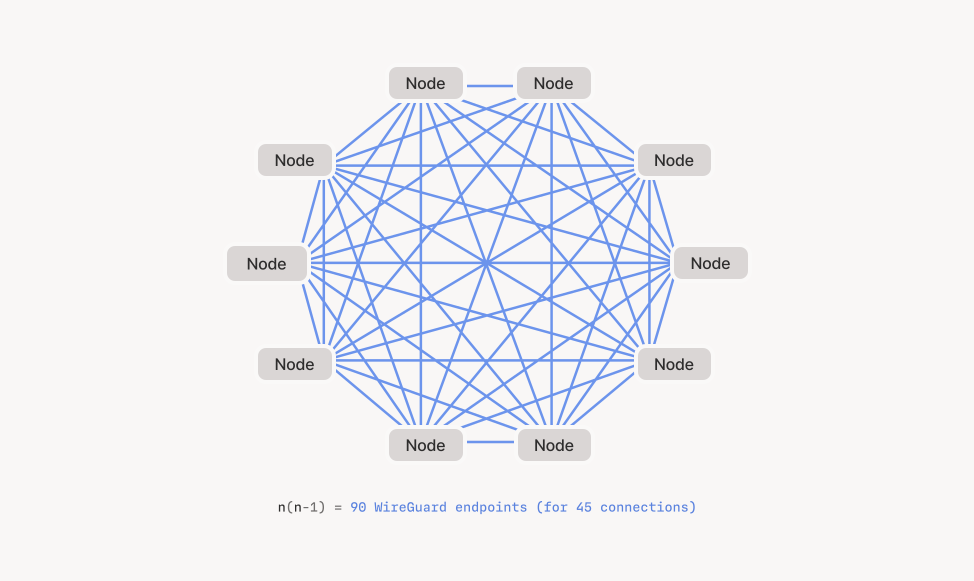
This mesh architecture means every device connects directly to every other device. There's no central bottleneck, no hub to route through. Your laptop in a coffee shop connects directly to your server at home, as long as both have Tailscale running.
Setting It Up
Install the client on each device. Log in. Done.
No Connectors. No resource definitions. No firewall ports. No certificate management.
Here's what I actually did:
- Installed Tailscale on my laptop (
brew install tailscale). - Installed Tailscale on my Proxmox server (their Linux install script).
- Installed Tailscale on my Raspberry Pi.
- Logged into all three with my Google account.
- That's it. I could SSH into any device from any other device.
The whole thing took about five minutes. Every device got a 100.x.y.z address from Tailscale's CGNAT range, and Tailscale's MagicDNS gave them human-readable names like proxmox.tailnet-name.ts.net.
ACLs, if you want them, are configured in a single JSON policy file:
{
  "acl": [
    { "action": "accept", "src": ["*"], "dst": ["*:*"] }
  ]
}
That default rule lets everything talk to everything. You can lock it down from there.
GitHub & Open Source
Tailscale's GitHub is impressive:
- tailscale/tailscale — the main client, 33k+ stars, BSD-3 license
- wireguard-go — their fork of the userspace WireGuard implementation
- github-action — connect CI/CD workflows to your tailnet
- tsidp — embed an OIDC provider directly in your tailnet
- k8s-operator — manage Tailscale in Kubernetes
The core client is fully open source, and Tailscale actively contributes back to the WireGuard ecosystem. They also maintain Headscale, an open-source self-hosted implementation of the Tailscale coordination server — meaning you can run your own control plane if you don't want to depend on Tailscale's SaaS.
What I Liked
- It just works. I can't overstate how nice this is.
- Direct peer-to-peer connections mean low latency and high throughput.
- WireGuard is fast and modern — minimal overhead, strong cryptography.
- No infrastructure to maintain. No Connectors, no relays.
- MagicDNS is a killer feature. I access my homelab services by hostname, not IP.
- For a single-user homelab, the default "everything can talk to everything" model is exactly what I want.
- Headscale exists if I ever want to self-host the control plane.
- It's fast. WireGuard over direct P2P consistently outperforms relayed connections.
What I Didn't Like
- The out-of-the-box security model is "everyone on the network." This is fine for me but would not fly in a corporate environment.
- ACLs are IP and port-based, not resource-based. You can't say "give user X access to the Jellyfin web UI" — you say "allow user X to connect to 100.x.y.z on port 8096."
- You're trusting Tailscale's coordination server (unless you use Headscale).
- Making it as granular as Twingate takes deliberate ACL engineering.
Head to Head
I put together a side-by-side comparison across the dimensions that mattered to me as a homelab user:
| Aspect | Twingate | Tailscale |
|---|---|---|
| Setup time | Hours — deploy connector, define resources, configure policies | Minutes — install, login, done |
| Architecture | ZTNA — resource-level access, no network address | Mesh VPN — every device gets a tailnet IP |
| Granularity | Per-resource, per-port, per-protocol | Per-IP, per-port via ACLs |
| NAT traversal | Yes, with relay fallback | Yes, STUN/ICE + DERP relays |
| Encryption | End-to-end via mTLS | WireGuard (Noise protocol, Curve25519, ChaCha20-Poly1305) |
| Open source | Partial — infrastructure components are OSS | Client is fully open source (BSD-3) |
| Performance | Good — relay can add latency | Excellent — direct P2P connections |
| Admin complexity | High — many moving parts | Low — set and forget |
| Single-user / homelab fit | Overkill — designed for teams with compliance needs | Perfect — designed for individuals and small teams |
| Self-hostable | No — Controller is SaaS-only | Yes — Headscale is a full OSS alternative |
| Identity | Deep integration — SSO, MFA, device posture checks | SSO via IdP, basic ACLs |
My Take
If I were setting up secure access for a company with compliance requirements, I would reach for Twingate. The audit trails, the granular resource policies, the device posture checks — those are features enterprises pay for. And Twingate delivers them well. It's also genuinely fun to configure if you're a security enthusiast who enjoys fine-tuning access policies. The admin console is beautiful, the resource model is thoughtful, and watching the whole thing click together is satisfying.
But for my homelab? Tailscale wins, and it's not close.
I don't need device posture checks for my Raspberry Pi. I don't need to define granular resource policies for every Docker container I run. I need my laptop to talk to my server securely, and I need it to be fast and reliable. Tailscale gives me that in five minutes with zero ongoing maintenance.
The WireGuard backend means connections are fast — I measured consistently lower latency through Tailscale's direct P2P tunnels compared to Twingate's relayed paths. And while the out-of-the-box security model is more lax (everything on the same network), you can lock it down with ACLs and tags if you put in the work. Tailscale can be just as granular as Twingate — it just takes deliberate effort to configure it that way.
I'm running both in parallel right now. But honestly? I keep reaching for Tailscale more often. It's the tool that gets out of my way and lets me access my homelab without thinking about it.
I've been thinking about trying Headscale — the open-source self-hosted Tailscale control server. The idea would be to run the Headscale controller on a cheap VPS in the cloud and have all my homelab nodes authenticate against it instead of Tailscale's SaaS. Same Tailscale client software, but I own the coordination layer. That might be a good middle ground — Tailscale's ease of use with Twingate's level of data sovereignty. Something to explore next.